How to Tell if Google's AI Overview Cites Your Site
· 2 min read
For a growing share of searches, the first thing Google shows is an AI Overview: a generated answer with a handful of source links. Being one of those sources can bring clicks even when you don't rank first. Being left out can cost you clicks even when you do.
The trouble is that Google gives you almost no way to see it.
What Search Console tells you (and what it doesn't)
Google counts clicks and impressions from AI features, AI Overviews included, inside the normal Web search type of the Search Console Performance report. There is no filter or column for them. You can see that a query got impressions, but not whether they came from the classic blue link or from a citation inside the AI Overview, and you cannot see AI Overviews that cite your competitors instead of you.
So to answer "does the AI Overview cite me?", you have to look at the results page itself.
Checking by hand
- Search your keyword in a private window, from the country you care about.
- If an AI Overview appears, expand it ("Show more") — part of it often loads after the page.
- Look at the source links and cards next to the answer, and search the page for your domain.
That works for five keywords. It doesn't work for two hundred, and AI Overviews come and go: a keyword can show one on Monday and none on Thursday, and the cited sources change too.
Checking automatically
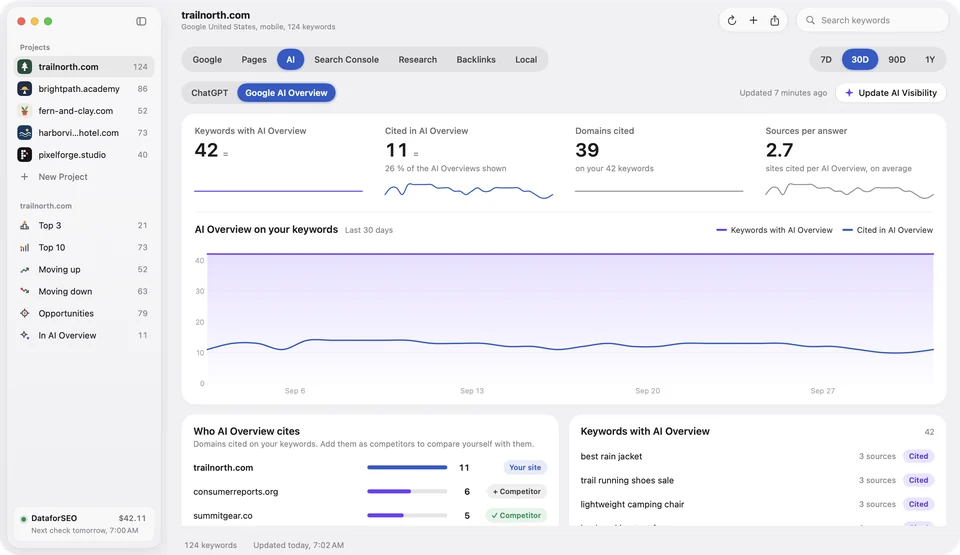
A rank tracker that reads the full results page can record, for every keyword and every day:
- whether an AI Overview appeared, so you know how much of your keyword set it affects;
- which domains it cited, so you see when a competitor takes the citation;
- whether it cited you, next to your normal organic position.
There is a catch worth knowing: Google often loads the AI Overview a moment after the rest of the page. A plain SERP request can return the box without its sources. DataforSEO's SERP API has an option to wait for that asynchronous part (load_async_ai_overview) so the citations are complete. It costs one extra unit per check when it is used.
What to do with the data
- Keywords with an AI Overview that doesn't cite you are your shortlist. Compare your page with the cited ones: they usually answer the question in the first lines, in plain sentences, with specific numbers or steps.
- Keywords where you rank in the top 3 but aren't cited are worth a closer look: the answer the AI quotes may be buried halfway down your page.
- Watch the trend, not one day. Citations rotate. A share of citations over 30 days tells you more than a single check.
Altitude tracks this for every keyword you follow on Google, on your own DataforSEO account, and also tracks which ChatGPT prompts mention your site. It runs on your Mac and you can try it free with one project and two keywords.
Try Altitude for free
A native rank tracker for the Mac: daily Google rankings, Search Console and AI Overview and ChatGPT visibility. Free with 1 project and 2 keywords, no card needed.