 Early-bird price · $59.95, one-time
Your Google rankings. On your Mac.
Altitude is a native rank tracker for the Mac. Every morning it tells you what went up, what went down and where your biggest opportunity is. Search Console, keyword research, backlinks, AI visibility and a local grid live in the same app. Pay once for the license, and for data only when you use it.
Free with 1 project and 2 keywords. No card, no time limit. macOS 14 or later, Apple silicon and Intel.
No DataforSEO account? Use an Altitude balance from $10: the app runs the checks for you, nothing to set up. How the balance works
- Signed and notarized by Apple
- No account, data on your Mac
- 14-day refund window
Your morning, summed up.
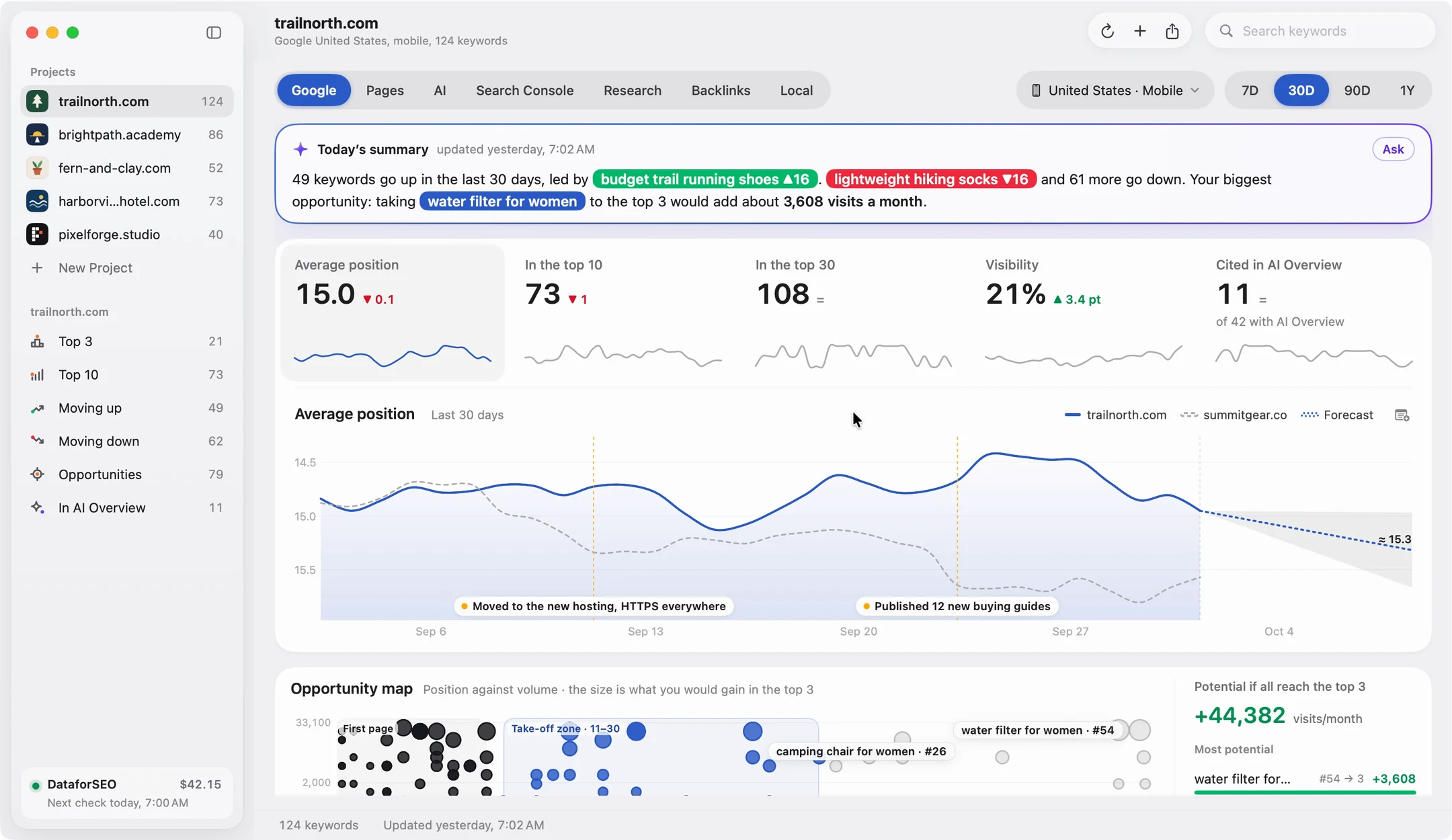
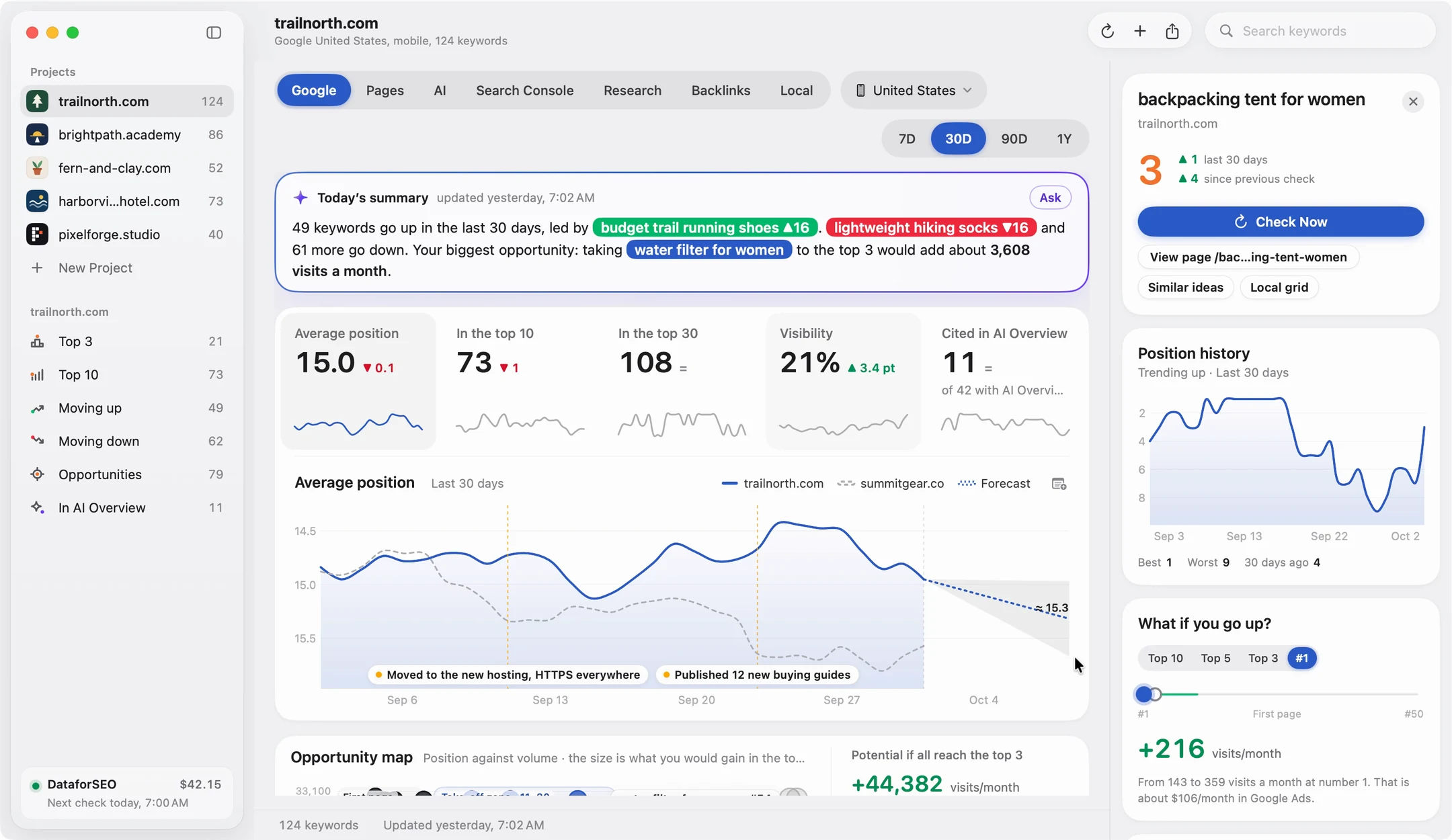
The Google tab starts with what changed and goes all the way down to every keyword. Everything is worked out on your Mac, from the data you already have.
Today’s summary. Then ask.
One sentence with what went up, what went down and your biggest opportunity. Press Ask and Altitude tells you what went down, where your biggest opportunity is or what to do this week. It works it out on your Mac, with nothing sent to an AI service.

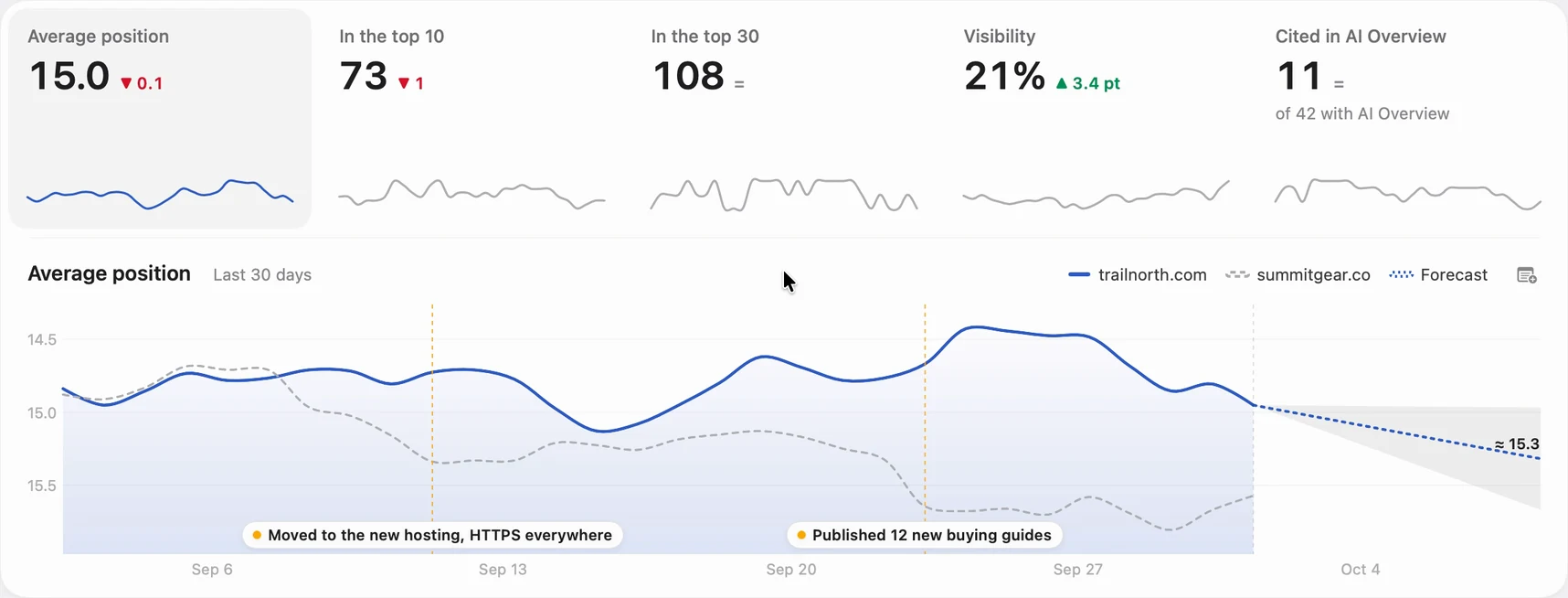
Every metric drives the chart.
Average position, top 10, top 30, visibility and AI Overview citations, each with its change. Click one and the chart follows it, with your first competitor as a dashed line, your notes on the day they happened and a forecast for the next 7 days.
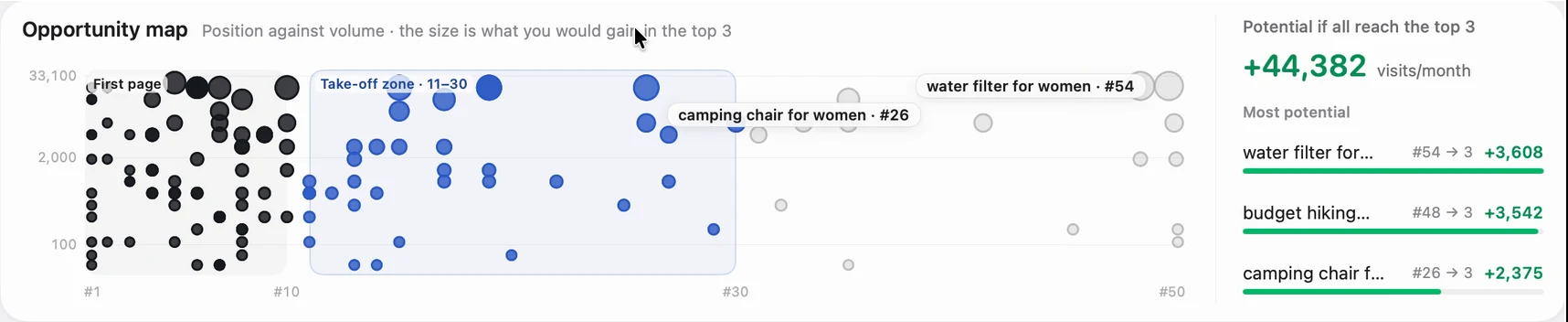
Where your missing traffic is.
The opportunity map places every keyword by position and search volume. Each bubble’s size is what you would gain in the top 3, and the take-off zone, 11 to 30, gathers the ones a push away.
Every keyword, in depth.
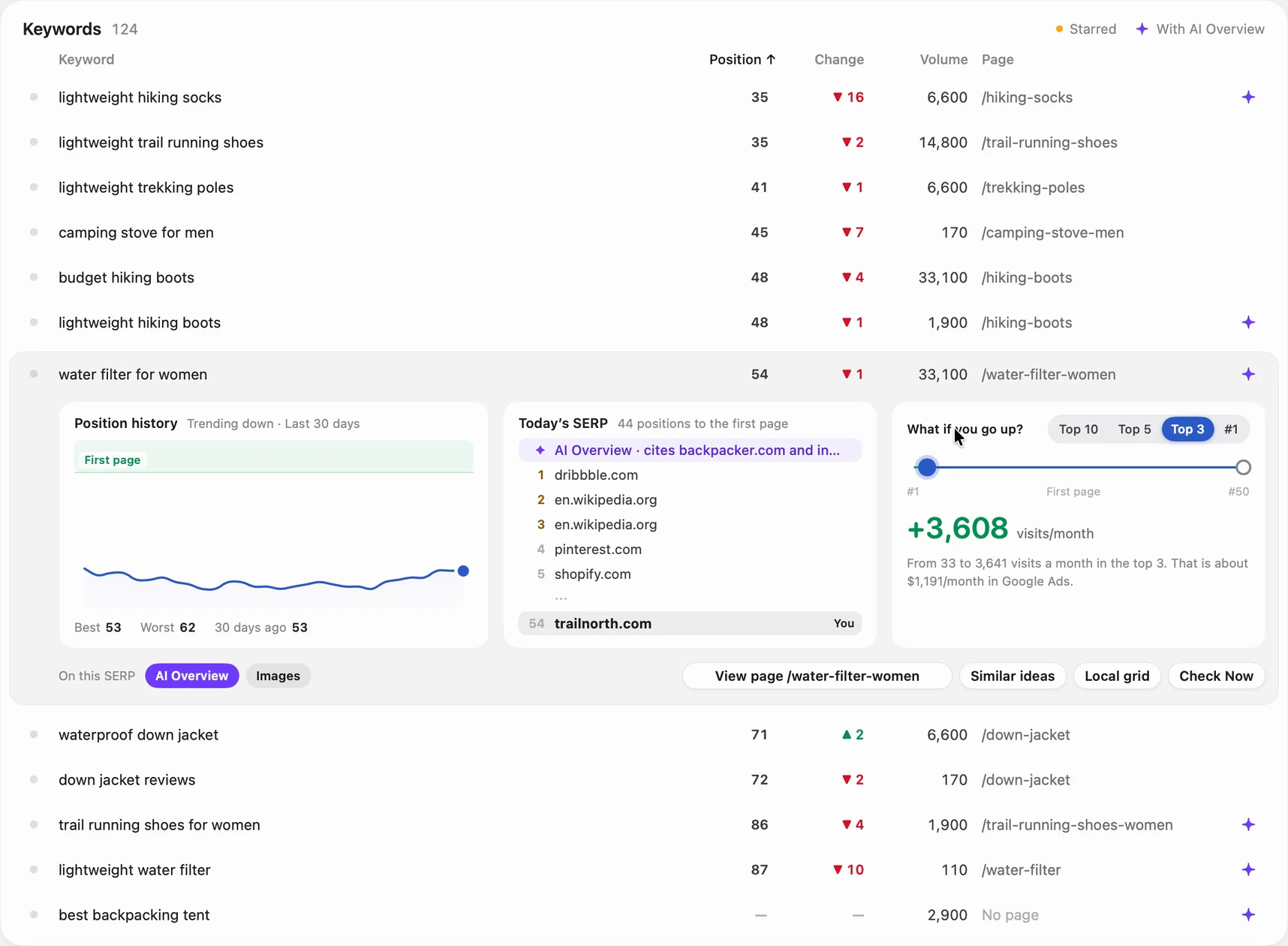
Open a row to see its position history, today’s results page with the AI Overview and the top 10, and What if you go up?: the visits you would gain in the top 10, top 5, top 3 or at #1, and what they are worth in Google Ads.
Seven sections
All your SEO, in one window.
Google, pages, AI, Search Console, research, backlinks and local, one click or one ⌘1–⌘7 away.
Your keywords, sorted by what matters.
Position, change, volume and page for every keyword. Smart lists filter it in one click, and the side panel gathers everything you know about a keyword, with a button to check it right now.
- Smart lists: Top 3, Top 10, Moving up, Moving down, Opportunities and In AI Overview
- Starred keywords and tags to keep big projects in order
- Google by country, language and device, plus up to five more markets: Bing, Google Maps, YouTube and AI Mode
Getting started
From download to rankings in minutes.
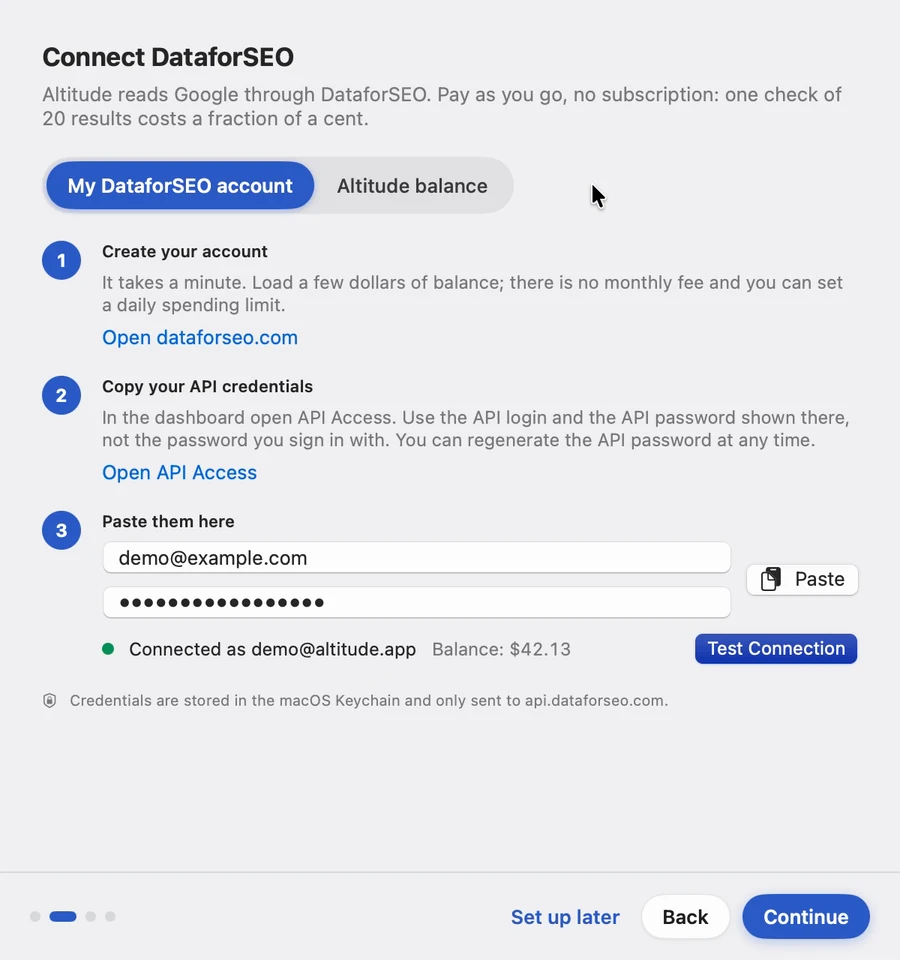
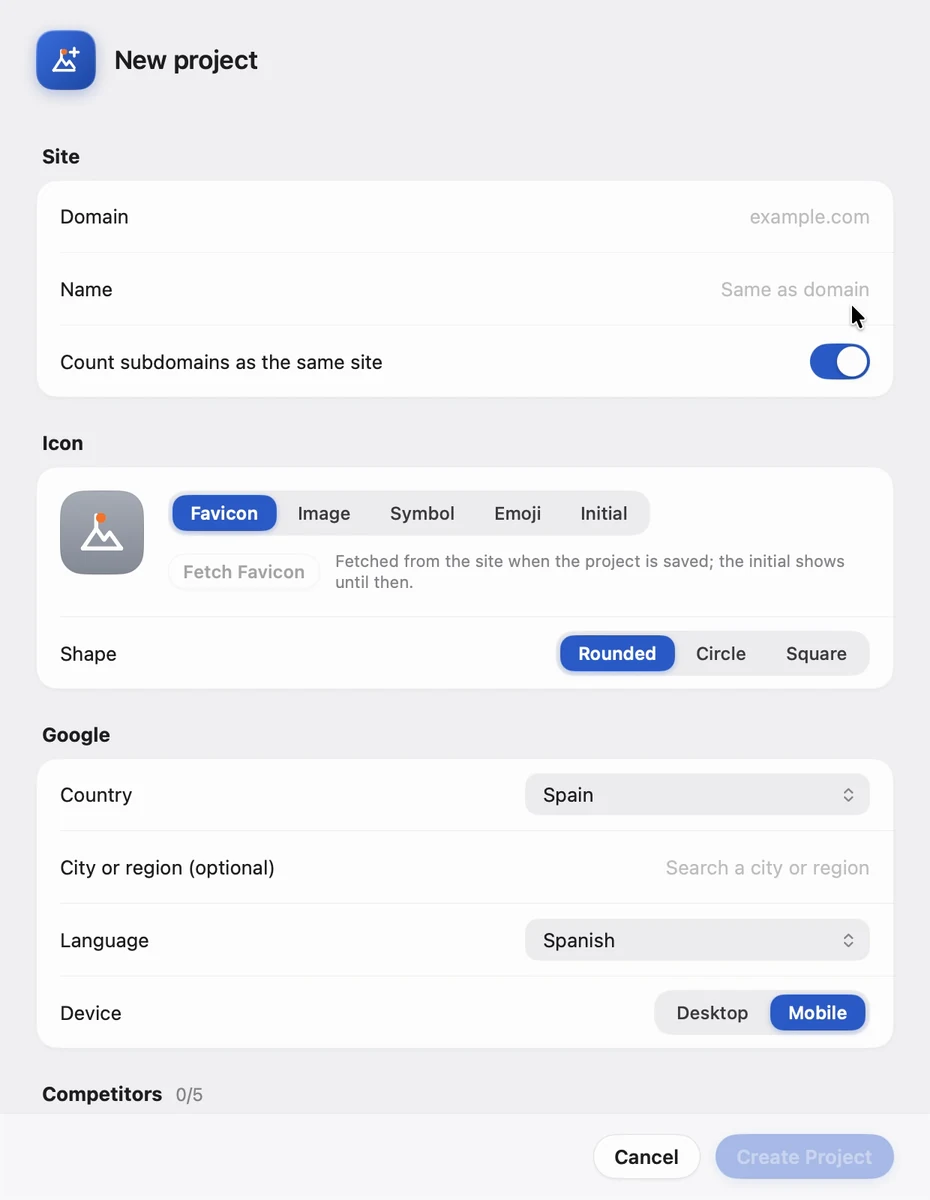
An assistant connects your data and helps you decide how much to spend. Then a project and its keywords.
Connect your data
Your DataforSEO account, with a guide to finding the credentials, or an Altitude balance with nothing to set up.
Create the project
Domain, country, language and device, with your site’s icon and your competitors.
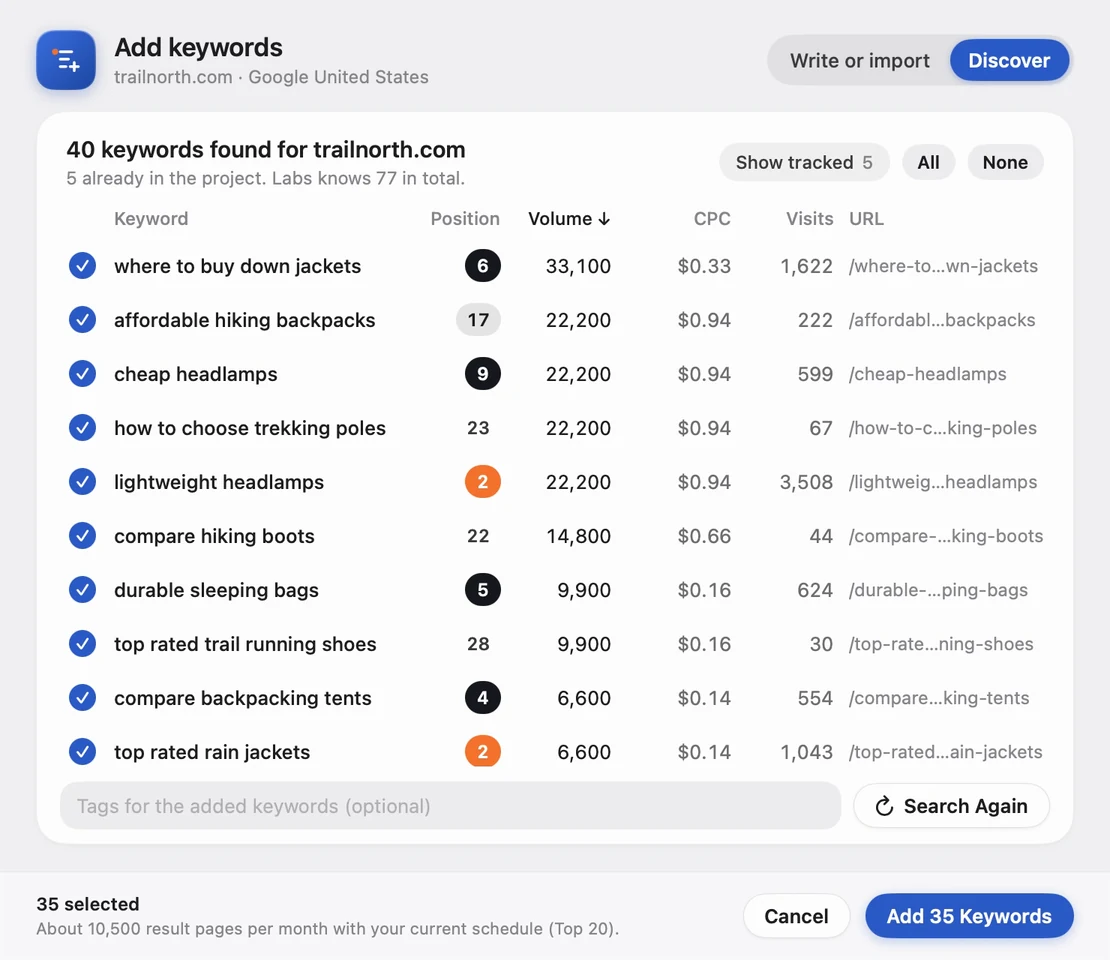
Add keywords
Type them, import a CSV from another rank tracker or discover the ones you already rank for, with the cost before you save.
In a minute
See it in action.
A tour of the Google tab, Ask, pages, AI, Search Console, research, backlinks, the local grid and widgets. Every screen is the real Altitude, with sample projects.
No sound.
Menu bar, widgets and alerts
No need to open the app.
Altitude also lives in your menu bar, on your desktop and in Notification Center.
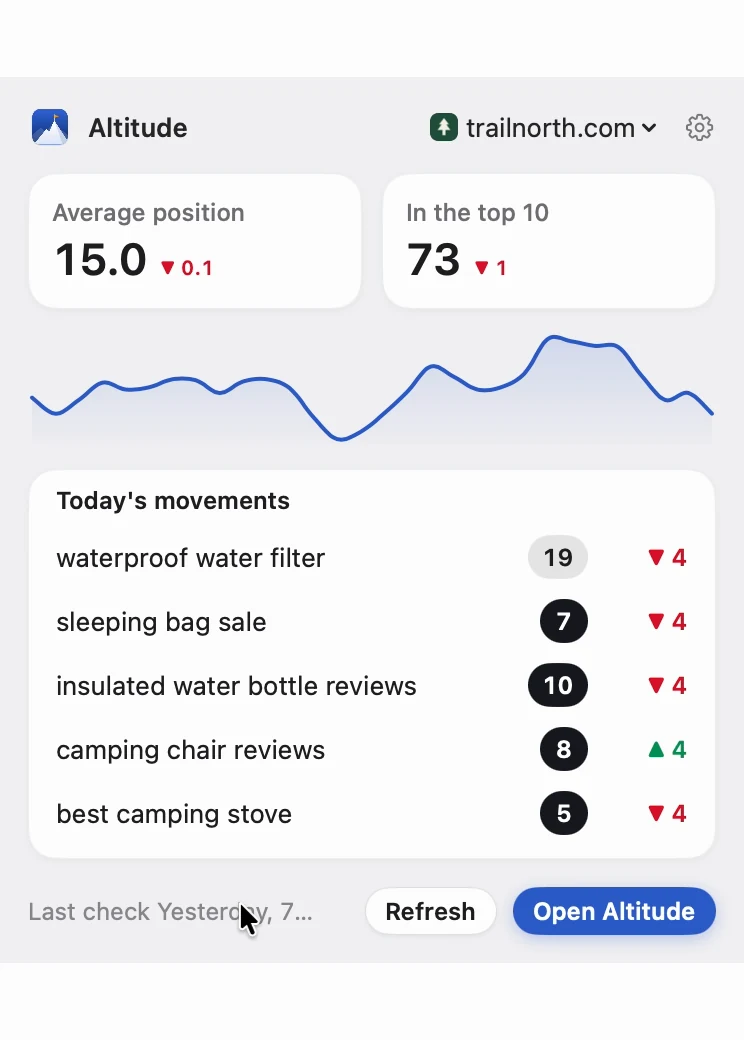


- Menu bar
- Average position, top 10, the 30-day chart and today’s movements for any project, with a button to refresh.
- Ten widgets
- A project in four sizes, all your projects, average position, a keyword with or without its chart, today’s movements, a summary, opportunities, Search Console and your DataforSEO account.
- Alerts
- When a keyword enters the top 3 or page one, sets a new best or moves as many places as you choose. Also when the AI Overview starts or stops citing you, and when you gain or lose backlinks. With quiet hours and a summary every Monday.
Reports
Client reports, with your brand.
A PDF per project with the metrics, the trend and every keyword, carrying your agency’s name, contact line and logo instead of Altitude’s. Weekly or monthly, it saves itself and a notification opens it in Mail, ready to send.


- You pick the sections: summary, positions, Search Console, backlinks, AI Overview and local
- Shared recipients, or each project’s own
- And your position history as CSV whenever you need it
Everything else
The details, too.
The things that don’t need a whole section but you’ll use every day.
- Bing, Google Maps, YouTube and AI Mode
- Up to five more markets per project: Bing, your Google Maps listing, your YouTube channel, and whether Google’s AI Mode cites you. Each with its own history.
- Competitors
- Up to five per project, measured on the same results you already check, with suggestions from the results page and the AI Overview.
- Notes on the chart
- Jot down a migration or a launch and it shows up on the chart on the day it happened.
- Keyword data
- Volume, CPC, difficulty, intent, 12 months of seasonality and the features its results page shows.
- Import from other trackers
- Bring keywords, tags, target pages and volume over from AccuRanker, SE Ranking, Wincher, Nightwatch, Semrush or Ahrefs in one CSV.
- Backups
- Export and import your whole library as JSON: projects, keywords, history and notes.
- Keyboard, Shortcuts and Spotlight
- Keyboard shortcuts for every section, smart list and everyday action, six actions for the Shortcuts app, and your projects and keywords in Spotlight.
- Light or dark
- Both designed with the same care. Follow the system or pick one.
- Ten languages
- English, Spanish, German, French, Italian, Portuguese, Dutch, Japanese, Korean and Simplified Chinese.
- Your data, on your Mac
- Your history lives on your machine, and your DataforSEO credentials in the macOS Keychain.
Cost
See the price before you spend.
DataforSEO bills per page of ten results, and Altitude plans around it: Top 20 by default, never the same keyword twice in one day, projects you can pause, and the price in view before every request.
- Estimates as you add keywords. Monthly result pages on your schedule, and what they cost at your account’s rate.
- A daily limit. A cap on what you spend each day, an alert at 80 %, and the last 30 days of usage in Settings.
- Anything billed instantly asks first. Live checks, search volumes, backlinks and AI queries always need your OK.
- Standard queue by default. Checks go out in batches of 100 on DataforSEO’s cheapest option, and Altitude follows them until they’re back.
- Full AI Overview only if you want it. Knowing whether it cites you costs one extra unit per keyword, refunded when there is no AI Overview. It’s off by default.
Run the numbers.
Altitude is a one-time purchase. Your only ongoing cost is data: DataforSEO charges per page of results checked, at cost on your own account or through an Altitude balance. Adjust the sliders and compare it with a subscription.
Altitude: $59.95 once + $88 of data
Nightwatch, the cheapest plan that covers that many keywords (up to 250): $468
DataforSEO charges $0.0006 per page of 10 results on the standard queue (public pricing). Subscriptions are entry-level plans as of September 2026. Compare →
Pricing
Pay once. No subscription.
Early buyers pay less. The price goes up in two steps, then stays there.
Altitude Pro
Plus your country’s taxes, calculated at checkout. Dodo Payments issues the invoice.
- First 10 licenses$59.95
- Up to license 50$79.95
- Afterwards$99.95
- Unlimited projects and keywords
- Google, Bing, Google Maps, YouTube and AI Mode
- Today’s summary, Ask and the opportunity map
- Pages, topics and a local grid
- Search Console with recommendations
- Keyword research and competitor gap
- AI Overview and ChatGPT visibility
- Backlinks: referring domains, anchors and opportunities
- Alerts, ten widgets and menu bar
- Branded PDF reports, CSV export and backups
- One license per Mac, movable when you change machines
Perpetual license: the version you buy works forever, and every 1.x update is included.
Secure checkout with Dodo Payments: card, Apple Pay or Google Pay. Your key arrives by email right away. 14 days to change your mind for a full refund.
Already bought it? Recover your key- 1 project and 2 keywords
- Every feature, so you can try it on your own data
- No card, no time limit
Enough to see how it works on your site. Upgrade to Pro to track all your keywords.
The data, without opening a DataforSEO account. Top up whenever you like, and each check costs DataforSEO’s price plus a margin. With your license, the balance shows up in the app by itself.
- $10
- $25+5 %
- $50+10 %
- No fees, no commitment
- Optional auto-recharge
- History and invoices in your account
FAQ
Questions people ask.
Do I need a DataforSEO account?
Not necessarily. With your own account you pay cost price for the data and see what every request costs before you send it; new accounts come with free trial credit. If you’d rather not open one, top up an Altitude balance and the app runs the same requests through our server, with a margin.
How much will DataforSEO cost me?
It depends on how many keywords you track and how often. For reference, 100 keywords checked daily at Top 20 depth is about 6,000 result pages a month: just under $4 on the standard queue. The app shows the exact figure at your account’s rate, and you can set a daily limit.
Is the license a subscription?
No. You pay once and the key keeps working. Every 1.x update is included, 1.1 among them.
How many Macs can I use it on?
Each license works on one Mac. When you switch machines, deactivate it in Settings › License on the old Mac and activate it on the new one. Using two Macs at the same time takes two licenses.
What if I change my mind?
You have 14 days to get a full refund, no questions asked, even if you’ve already activated the key. Use the withdrawal form or just reply to your purchase email, and the key stops working once we refund you.
Does Ask use ChatGPT or send my data anywhere?
No. Ask understands questions about your keywords (what went down, where your biggest opportunity is, what to do this week) and works out the answer on your Mac from the data you already have. It uses no language model and makes no requests.
How much does keyword research cost?
Each search is one DataforSEO Labs request: roughly $0.05 for 300 ideas, with volume, difficulty, intent and SERP features included. The app shows the price upfront and keeps your latest lists, so you never pay twice for the same thing.
Can I track Bing, Google Maps, YouTube and AI Mode?
Yes. Add them as markets of the project: Bing with its country and language, Google Maps with the city your business is in (it finds your listing by the website it links to), YouTube with your channel, and AI Mode to see whether Google’s AI Mode answer cites you. On the standard queue, Bing costs the same as Google ($0.0006 per 10 results), Maps $0.0006 per 100 places, YouTube $0.0006 per 20 results and AI Mode $0.0012 per check. A 5 × 5 local grid is 25 Maps requests, about $0.015.
How does Altitude know what ChatGPT says about my site?
Two ways. Write your own prompts, up to 25 per project, and Altitude keeps every ChatGPT answer and tells you whether it cites your site, mentions you, or neither. And with DataforSEO’s AI mentions data you see the prompts that already cite you, and which pages.
Can I bring my keywords from another rank tracker?
Yes. Export a CSV from AccuRanker, SE Ranking, Wincher, Nightwatch, Semrush or Ahrefs and import it in Add Keywords: Altitude reads their columns and brings the tags, target pages and search volume along. Ranking history doesn’t come across.
How much does a backlinks update cost?
At most about $0.14 without competitors and about $0.23 with five: four to seven requests to DataforSEO’s pay-as-you-go Backlinks API. The app shows the price before you confirm.
Does my Search Console data go through your servers?
No. You sign in on Google’s own page, access is read-only, and the data goes straight from Google to your Mac. You can disconnect at any time.
How are taxes handled? Is there an invoice?
Yes, you always get an invoice. Dodo Payments is the merchant of record: it calculates your country’s taxes at checkout, before you pay, and emails you the invoice.
Does it run on Intel Macs?
Yes. It needs macOS 14 or later and runs on both Apple silicon and Intel. You download it directly, signed and notarized by Apple.
Why isn’t it on the App Store?
So it can be sold for a single fair price and updates can ship without waiting on review. The app is signed with a Developer ID and notarized, as macOS requires.
Start free today.
Download it, connect DataforSEO or top up an Altitude balance in two minutes, and see your rankings this afternoon. If you like it, buy the license once.
Made by Oriol Nadal in Barcelona, with no investors. Support comes from the person who writes the code: [email protected].
- Signed and notarized by Apple
- No account, data on your Mac
- 14-day refund window