How to Check Your Google Rankings (Accurately)
· 3 min read
Searching for your own keyword and scrolling until you find your site feels like the obvious way to check a ranking. It is also the least reliable one. Google tailors results to the country, the city, the device and the language of whoever searches, so the position you see is rarely the position your customers see.
There are three ways to check rankings properly. Each answers a slightly different question.
1. A manual search (quick, but misleading)
A private window removes your search history and signed-in account, but not your location. Google still uses your IP address to localise results, so a search from Barcelona for "dentist" shows a different page than the same search from Madrid. Results also differ between mobile and desktop.
Use a manual search for a quick sanity check of one keyword. Don't use it to report progress, and never to compare one week with another: you cannot reproduce the same conditions twice.
2. Google Search Console (free, delayed, averaged)
Search Console shows the average position of your pages for every query that made them appear. It is free and it comes straight from Google, which makes it the best source for which queries bring impressions and clicks.
Its limits matter when you track positions:
- It is an average. If a page ranks 3rd in one city and 15th in another, Search Console reports something in between, for a position nobody actually saw.
- It only knows queries where you appeared. A keyword where you sit on page five usually shows no data at all, so you cannot watch it climb.
- It lags. Data arrives with a delay of about two days and is kept for 16 months.
- No competitors. It tells you nothing about who ranks above you.
3. A rank tracker (exact position, every day)
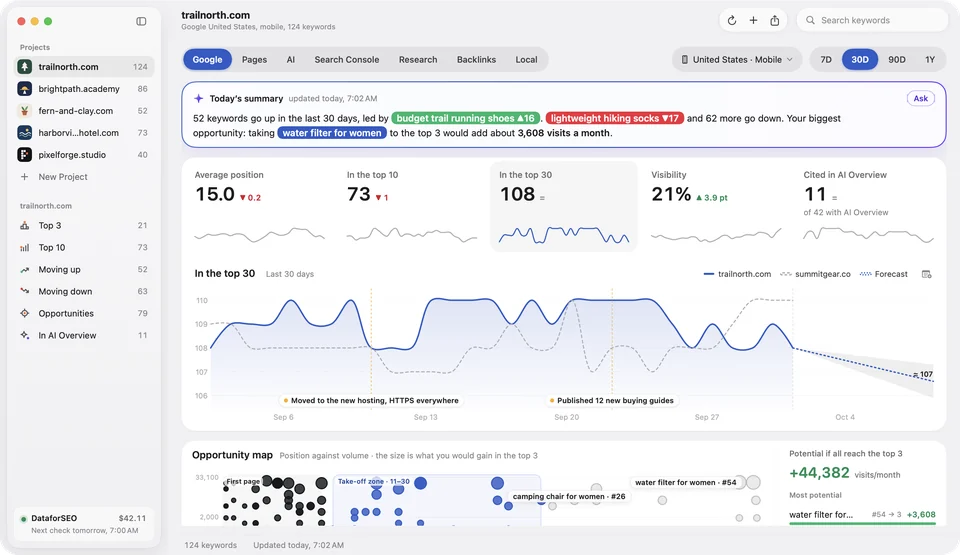
A rank tracker runs the search for you from a fixed place — a country or a city, a device, a language — every day, and records exactly where your site appears in the results. Because the conditions never change, today's number can be compared with last month's.
A good tracker also stores the whole results page, so you see who sits above you, which SERP features appear (AI Overviews, maps, videos) and when your ranking URL changed.
Which one should you use?
| Question | Best source |
|---|---|
| Which queries bring me clicks? | Search Console |
| Where do I rank today for my target keywords, in my market? | Rank tracker |
| Did last week's change move my position? | Rank tracker |
| Who ranks above me? | Rank tracker |
| Quick look at one keyword | Manual search, in a private window |
The two complement each other: Search Console finds the queries worth tracking, the rank tracker follows them exactly. Altitude does both on your Mac: it connects to Search Console and checks your keywords daily through DataforSEO, so you pay cents for the data instead of a monthly subscription. You can try it free with one project and two keywords.
Tips for accurate tracking
- Track the market your customers search from. A local business should track its city, not the whole country.
- Track mobile if most of your traffic is mobile. Positions on phones often differ by a few places.
- Track the top 20, not just the top 10. Movements on page two show you which pages are about to break through.
- Look at trends, not single days. Rankings move a little every day; a week-over-week trend tells you more than one jump.
Try Altitude for free
A native rank tracker for the Mac: daily Google rankings, Search Console and AI Overview and ChatGPT visibility. Free with 1 project and 2 keywords, no card needed.